Windows · PowerShell
Open PowerShell → paste → Enter
irm https://screenshotpipeline.com/install.ps1 | iex
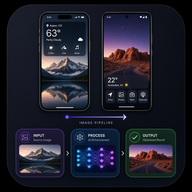 Screenshot Pipeline
ASO-ready App Store & Google Play pipelines. WYSIWYG frames (1:1 icon, 1024×500 feature, phone SS). 1 free screenshot — then unlock Pro or Studio.

Open PowerShell → paste → Enter
irm https://screenshotpipeline.com/install.ps1 | iex
Open Terminal (bash/zsh) → paste → Enter
curl -fsSL https://screenshotpipeline.com/install.sh | bash
Open Terminal.app (Spotlight: Terminal) → paste → Enter
curl -fsSL https://screenshotpipeline.com/install.sh | bash
Installs to ~/screenshot-pipeline, then run ./scripts/gui.sh for the local gallery.
Play: 512 icon + 1024×500 feature + 8 phone shots. iOS: 1024 icon + 10 slots. WYSIWYG ratios in gallery.
One store slot with two phones, open-book or steep same-side — market-proven silhouettes.
Continuous design across this + next store slot — not dual-in-one-frame confusion.
Spend AI tokens on live-store checks, promo copy, and icon generation. Free tier: 0 tokens after the first SS.
Hard fail on sim bars, empty web, third-party browsers. Discard raws forever.
Approved sets → Google Play (icon → feature → SS) & App Store Connect with size QA.
Paywall after your first store screenshot. Firebase auth + usage on the edge.
402 paywall until Pro or Studio.
AI actions (eval vs live store, promo AI, icon imagine) spend tokens.
Paid plans: email info@linespotting.com for Pro ($9/mo) or Studio ($99).
No Stripe Checkout URLs are configured yet.